
Sleep as Android: Smart alarm
Petr Nálevka (Urbandroid)Lifestyle
4.617.66K Reviews
- Version
- Varies With Device
- Installs
- 10.00M
- Age Rating
- Everyone
Screenshots
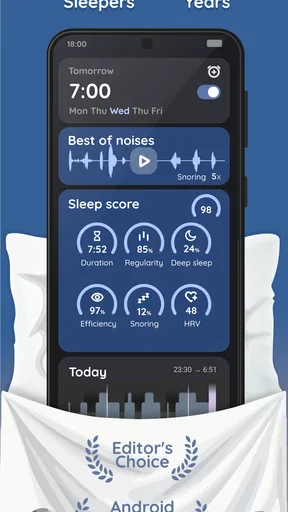
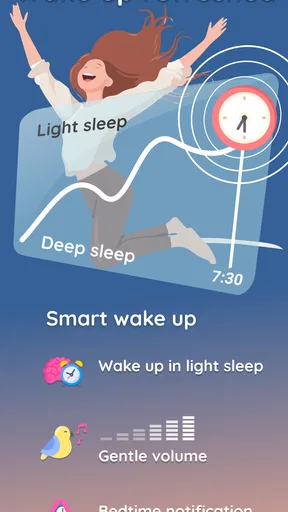
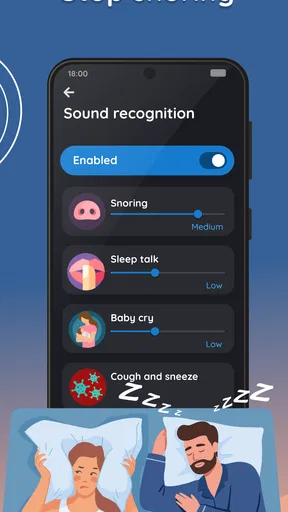
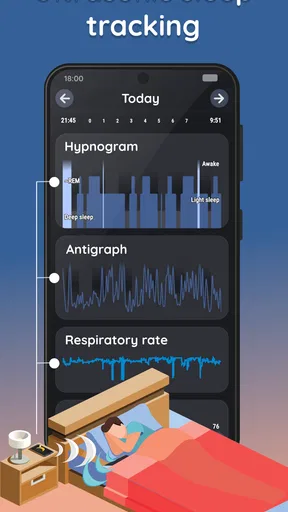
Our Review of Sleep as Android: Smart alarm
 Analysis by Appyee
I approached Sleep as Android as a first-time user would: not as a cure for poor sleep, but as a way to make the alarm routine more thoughtful and to notice patterns over time. That distinction matters. A sleep graph can be interesting, and a gentler wake-up can make mornings feel less abrupt, but neither guarantees that you have slept well. I find the app most useful when I treat its tracking as a rough personal log and focus on whether its alarm setup fits my actual schedule.
What to expect from a sleep-focused alarm
Sleep as Android is a free lifestyle app from Petr Nálevka, also known as Urbandroid. It has been around since October 24, 2010, and its long-running presence is reflected in a 4.6 average from around 389,000 ratings, with more than 10 million installs. The audience rating is Everyone. Some optional purchases are available in the app, ranging from $0.99 to $75 per item, so I would check what is included before paying for anything rather than assuming every tool is free.
At its heart, this is an alarm app with sleep tracking built around the idea of waking within a chosen window instead of at one rigid moment. That can be appealing if your mornings are flexible, but it is not a promise that the app can identify a perfect moment every night. Tracking based on a phone’s movement and sound is best read as an estimate, not a medical assessment. I would use the patterns to reflect on habits, not to diagnose a sleep problem or make health decisions.
It also helps to know what you want from it before setup. If your only need is a dependable alarm at an exact time, your phone’s built-in clock may be simpler. If you want to experiment with a wake-up window, gentle sounds, and a record of nights, this app gives you more to work with. The trade-off is that more options mean a little more setup and a reason to keep the phone in a consistent place overnight.
Make the first setup easy to trust
For a first night, I would keep things simple: choose a bedtime and wake-up plan that reflects a normal weekday, select a sound you would actually tolerate, and avoid changing several tracking settings at once. That makes it easier to tell whether the routine feels better. Put the phone somewhere stable and close enough for the app to register the night in the way it expects; moving it around or changing its position from night to night can make comparisons less useful.
Before relying on a new alarm for an important morning, test the alarm behavior while you are awake. Check the sound level, make sure the selected tone is one you recognize, and confirm that you know how to stop or snooze it. I would also keep a backup alarm for an early flight, an exam, or a first day at a new job until I am confident the setup works on my device. That is not a knock on the app; it is sensible practice whenever a phone is responsible for waking you.
My first meaningful success would not be a dramatic sleep score. It would be waking within the planned window, feeling less startled, and having a night record that I can compare with a few later nights. Give the routine several ordinary evenings before drawing conclusions. One unusually late bedtime or restless night can skew your impression, while a consistent pattern is more useful for deciding whether the app is helping you.
Who will get the most from it
I can see this working well for people who already use their phone as an alarm and are curious about their nighttime routine, especially if they have some flexibility around when they get up. A student with a loose morning schedule, someone working regular daytime hours, or a person trying to notice whether late screens and shifting bedtimes coincide with rough mornings can get practical value from the combination of tracking and alarms.
It is less suitable for someone who needs an alarm that must ring at one exact minute with no flexibility, or for anyone who wants clinical sleep monitoring. It may also be the wrong fit if you do not want a phone near the bed, dislike configuring apps before sleep, or find nighttime tracking distracting. In those situations, a basic alarm clock, a quiet bedside clock, or advice from a qualified health professional may serve you better.
How it fits into an ordinary morning
Picture a weekday when you have a little room in your morning but still need to be out the door on time. You set the wake-up window the night before, choose a calm sound, and leave the phone in its usual spot. In the morning, the gradual alarm feels less abrupt than a sudden, loud tone; afterward, you can look at the recorded night without treating the graph as a verdict. If you had a late evening, the useful takeaway may simply be that your routine changed—not that the app has found a hidden medical explanation.
That is where I think the app can be more helpful than a standard clock: it connects the act of waking with a simple record of the night, so you can notice whether a consistent bedtime seems to make mornings easier. A dedicated sleep tracker may offer a different emphasis, while a basic clock is quicker and less involved. Sleep as Android sits between those approaches: more informative than a plain alarm, but dependent on the phone and on your willingness to interpret estimates carefully.
Small habits that make the results more useful
Consistency is more valuable than trying every option at once. Keep the phone in the same position, use a similar bedtime routine for several nights, and change only one habit when testing an idea. For example, if you want to see whether a calmer wind-down helps, avoid changing both your bedtime and alarm sound in the same week. This is not a controlled experiment, but it gives you a better chance of spotting a pattern that matters to you.
There is also a practical trade-off in using a phone overnight: the same device serves as tracker, alarm, and source of temptation. I would set it up before getting into bed and avoid opening unrelated apps once the routine is ready. If you share a room, consider whether recorded sounds or an audible alarm might disturb someone else; a gentle tone can still be disruptive to a light sleeper nearby. Those everyday details can matter more than a sophisticated graph.
What to do when a night looks wrong
A missing or strange-looking record does not automatically mean that your sleep was unusual. The phone may have been moved, the room may have been noisy, or the night may simply have differed from your normal routine. Rather than reacting to one odd chart, I would check whether the phone stayed where I left it and compare several nights recorded under similar conditions. If the process feels unreliable or interferes with sleep, simplifying the setup—or using only the alarm—is a reasonable choice.
Likewise, the app’s suggestions are best treated as prompts for ordinary habits, not instructions that fit everyone. Reducing late-night screen use may be easy for one person and impractical for another; a sleep schedule can be affected by work, caregiving, travel, or health. I like having a place to notice routines, but I would not let a score dictate how rested I should feel. Your own energy and circumstances deserve more weight than a single night’s estimate.
How I would decide whether to keep using it
After a week or two of ordinary use, ask a few plain questions: did the alarm wake you reliably, did the wake-up window suit your commitments, and did looking at the night record lead to a useful change? If the answers are yes, keep the routine steady. If you mainly spend time adjusting settings without sleeping or waking any better, a simpler alarm may be the better tool. The app is free to start, but optional in-app purchases make it sensible to decide what you actually need before spending.
I would also separate convenience from health concerns. If you are persistently exhausted, have troubling sleep symptoms, or are worried about a pattern, a consumer app cannot replace professional guidance. Its strongest role is everyday awareness and a more considered alarm, not a diagnosis. That boundary makes the tracking more useful, because it keeps expectations realistic.
My recommendation is to try Sleep as Android if you want more than a fixed alarm and are willing to keep your setup consistent. Start with one ordinary night, verify the alarm before depending on it, and judge the experience by how it fits your mornings—not by a single graph. If you value simplicity above all, your built-in clock may be enough; if you want a gentle alarm paired with a personal sleep log, this is a thoughtful place to begin.
What Makes Sleep as Android Special?
First things first, let’s dive into what sets Sleep as Android apart from the countless other alarm apps out there. The app is designed to track your sleep cycles and wake you up during your lightest sleep phase. This means no more rude awakenings when you’re deep in dreamland. Instead, you’ll wake up feeling refreshed, like you’ve just had the best sleep of your life.
Sleep Tracking and Analysis
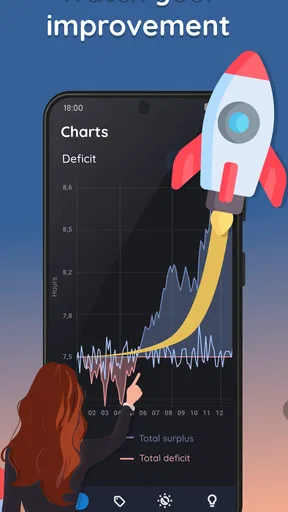
One of the coolest features of this app is its ability to track your sleep patterns. Using your phone’s sensors, it monitors your movements and sounds while you snooze. It then provides a detailed analysis of your sleep cycles, helping you understand your sleep quality. I was pretty amazed when I saw my first sleep graph. It’s like having a personal sleep scientist in your pocket!
Plus, the app offers insights on how to improve your sleep. Whether it’s cutting down on late-night screen time or adjusting your bedtime routine, these tips have genuinely helped me catch some better Z’s.
Gentle Wake-Up Alarms
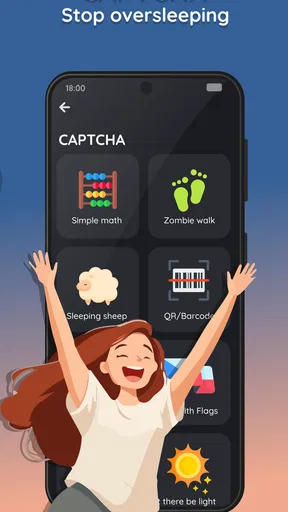
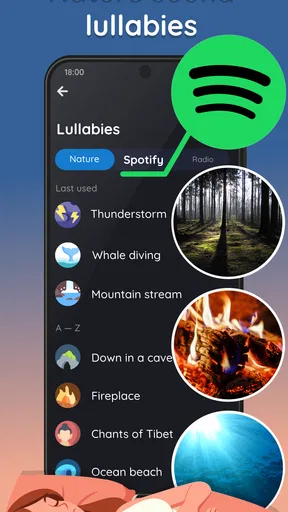
Forget those harsh, blaring alarms that jolt you awake. Sleep as Android uses gentle sounds like birds chirping, ocean waves, or even your favorite music to wake you up slowly. It’s like Mother Nature herself is nudging you awake. And if you’re a heavy sleeper like me, there’s a feature to gradually increase the volume, ensuring you don’t oversleep.
Additional Features Worth Mentioning
Beyond sleep tracking and smart alarms, the app is packed with nifty features. There’s a sleep talk recording function, which is both hilarious and slightly terrifying. If you’ve ever wondered if you talk in your sleep, now’s your chance to find out!
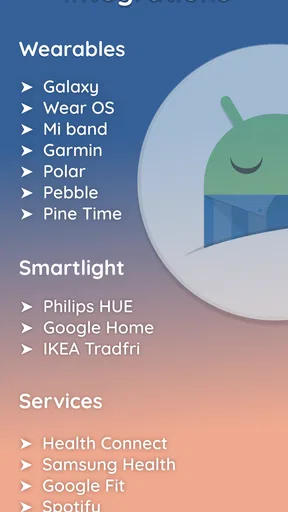
Additionally, it supports integration with various smart devices. If you have a smart light, it can simulate sunrise in your room to help you wake up naturally. It also syncs with fitness wearables, providing even more accurate data. The app truly feels like a personalized sleep companion.
User-Friendly Experience
One thing I really appreciate about Sleep as Android is its clean and intuitive interface. Navigating through the app is a breeze, and setting up alarms or checking your sleep stats is straightforward. It’s clear that a lot of thought went into making this app user-friendly, which is something I always value.
And let’s not forget the customization options. You can tweak everything to suit your preferences, from the type of alarm to the sleep tracking sensitivity. It’s all about making the app work for you.
Final Thoughts
Overall, Sleep as Android has been a revelation for my sleep routine. Its smart alarm and insightful sleep analysis have genuinely improved my mornings. If you’re looking to upgrade your sleep game, I highly recommend giving it a try. You’ll be amazed at how much better you’ll feel waking up on the right side of the bed.
Ready to start waking up refreshed? You can download Sleep as Android on both Android and iOS. Sweet dreams!
Verdict
Strengths of Sleep as Android: Smart alarm
- Tracks sleep cycles accurately
- Integrates with smart home devices
- Offers gentle wake-up options
- Includes sleep talk recording
- Supports multiple alarm types
Limitations of Sleep as Android: Smart alarm
- Free version has limited features
- Requires device under pillow for tracking
- Can drain battery quickly
- May not sync well with all wearables
- Some features need in-app purchases
Similar Picks in This Category
View All
SmartThings
Samsung Electronics Co., Ltd.4.6

Google Home
Google LLC4.0

Pinterest4.2

Astrotalk - Talk to Astrologer
Astrology & Horoscope4.7

My Verizon
Verizon Consumer Group4.5

Samsung Wallet (Samsung Pay)
Samsung Electronics Co., Ltd.4.1
Frequently Asked Questions
What features does Sleep as Android offer to improve sleep quality?
Sleep as Android provides a range of features designed to enhance your sleep quality. These include smart alarms, sleep tracking, snore detection, and integration with wearable devices. The app analyzes your sleep patterns, offering insights and recommendations to optimize your sleep cycle. It also includes soothing sounds and lullabies to help you fall asleep more easily.
How accurate is the sleep tracking in Sleep as Android?
Sleep as Android utilizes advanced algorithms to track your sleep stages accurately. By analyzing your movement and sounds during sleep, it provides detailed insights into your sleep patterns. While it offers fairly accurate data, the precision can vary depending on the device and its placement. For best results, using a compatible wearable device is recommended.
Is the app compatible with all Android and iOS devices?
Sleep as Android is compatible with most Android devices, but not all features are available on iOS. The app integrates with various wearable devices like smartwatches and fitness bands, enhancing its functionality. It’s advisable to check the app’s compatibility with your specific device and operating system version before downloading.
Does Sleep as Android offer any free features, or is it a paid app?
Sleep as Android offers a free trial period with access to most features, allowing users to explore its capabilities. After the trial, some features may require a one-time payment or subscription. The paid version unlocks full functionality, including extended sleep tracking, smart alarms, and advanced analytics.
How does Sleep as Android handle user data and privacy?
Sleep as Android prioritizes user privacy and data protection. The app collects sleep-related data to provide insights and recommendations, but it does not share personal information without consent. Users can review and manage data permissions within the app settings. It's always a good practice to read the privacy policy before using the app.
